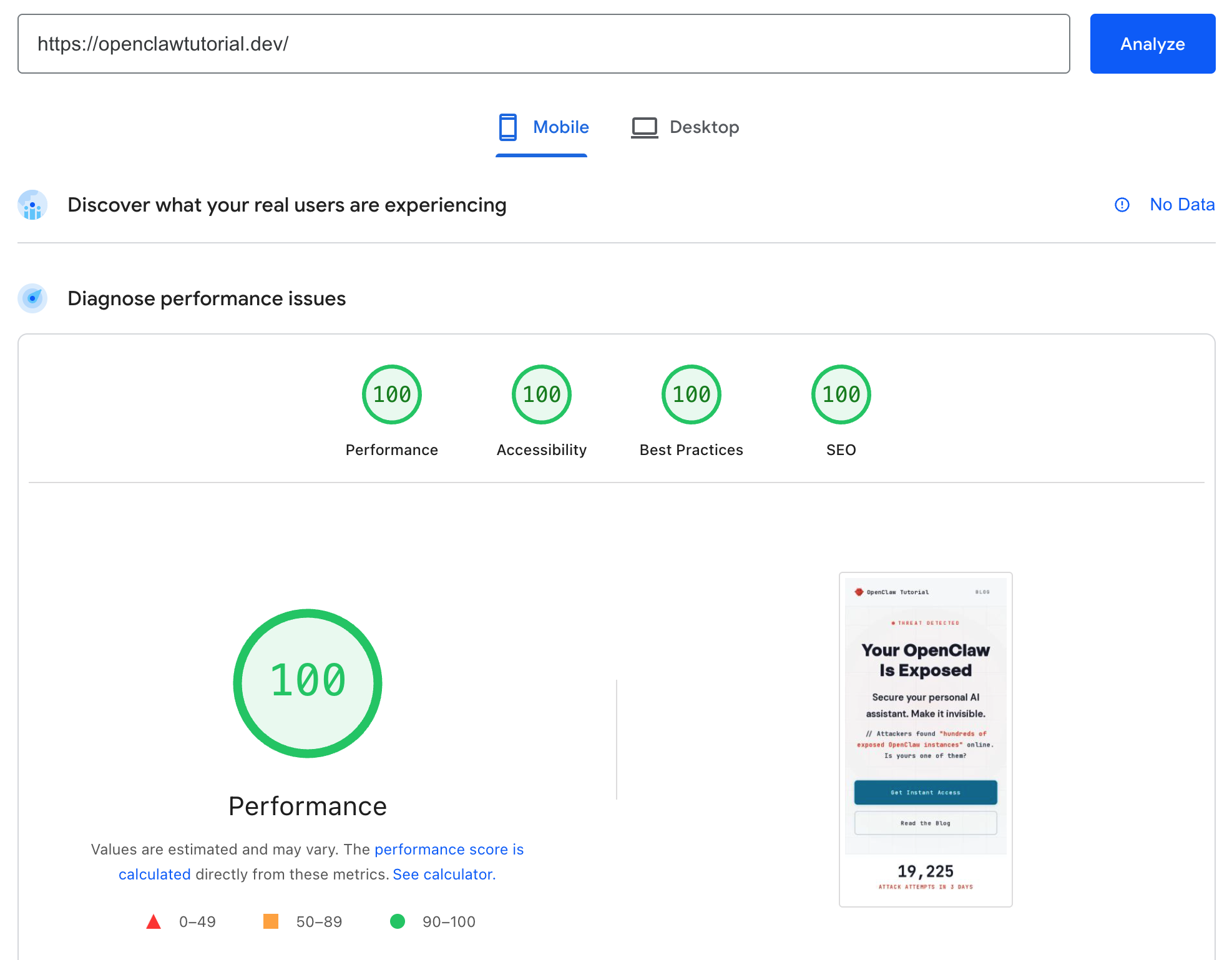
100. 100. 100. 100. Performance, Accessibility, Best Practices, SEO — all perfect. On mobile.
The average website scores 50 on mobile performance. Most developers never break 90. A perfect score across all four categories is rare enough that people screenshot it when they see one.
This post is that screenshot — plus every technique, checklist, and decision behind it. Use it as a framework. Hand the checklists to an AI coding agent. Fix your site in an afternoon.
Why PageSpeed Scores Actually Matter
PageSpeed Insights isn’t vanity metrics. Google uses Core Web Vitals (a subset of these scores) as a ranking signal. That means:
- Slower sites rank lower in search results
- Poor accessibility means you’re excluding users and violating WCAG guidelines
- Missing SEO fundamentals means Google can’t properly index your content
- Best Practices violations signal security and quality issues to browsers
A study by Portent found that conversion rates drop 4.42% for every additional second of load time. Going from 2s to 4s page load can cost you nearly 10% of conversions.
This isn’t about chasing a number. It’s about shipping a site that’s fast, accessible, and findable.
Step 0: Choose the Right Foundation
Before touching a single line of CSS, your framework choice determines your ceiling.
| Framework | Typical Mobile Score | Why |
|---|---|---|
| Astro | 90–100 | Ships zero JS by default. Static HTML + CSS only. |
| Next.js | 60–85 | React hydration overhead, client-side JS bundle |
| WordPress | 30–60 | Plugin bloat, render-blocking scripts, unoptimized themes |
| Gatsby | 70–85 | Build-time optimization helps, but still ships React runtime |
| Plain HTML/CSS | 95–100 | Nothing to slow it down, but no DX |
Astro is the sweet spot. You get component-based development, Markdown/MDX content, and build-time optimization — but the output is static HTML and CSS. No JavaScript runtime shipped to the browser unless you explicitly opt in.
This site is built with Astro 5 and hosted on Cloudflare Pages. Total JavaScript shipped: zero bytes. That’s the foundation that makes 100/100 possible.
If you’re on WordPress or a heavy JS framework and struggling with performance, no amount of optimization will match what a static-first framework gives you for free.
The Performance Playbook (Score: 100)
Performance is where most sites struggle. Here’s every fix that matters.
Self-Host Your Fonts
This was the single biggest win — it took my score from 88 to 98 in one change.
External fonts (Google Fonts, Adobe Fonts, Fontshare) require DNS lookups, TLS handshakes, and round trips to third-party CDNs before text renders. That’s 2-3 seconds of render-blocking requests on mobile.
/* Before: external CDN (render-blocking) */
@import url('https://fonts.googleapis.com/css2?family=...');

/* After: self-hosted (instant) */
@font-face {
  font-family: 'General Sans';
  font-weight: 400;
  font-style: normal;
  font-display: swap;
  src: url('/fonts/general-sans-400.woff2') format('woff2');
}
How to do it:
- Download your fonts as
.woff2files (the most compressed format) - Place them in your
public/fonts/directory - Add
@font-facedeclarations in your CSS - Remove all external font
<link>tags and@importstatements - Use
font-display: swapso text renders immediately with a fallback
Pro tip: Use variable fonts when available. A single variable font file replaces 4-6 weight-specific files. I used variable fonts for DM Sans and JetBrains Mono — one file each covering all weights.
My total font payload: ~160KB across 6 woff2 files. Zero external connections.
GPU-Composited Animations Only
Animating box-shadow, border, width, height, or margin forces the browser to recalculate layout on every frame. The fix: only animate transform and opacity.
/* Bad: triggers layout recalculation every frame */
@keyframes pulse {
  0%, 100% { box-shadow: 0 0 6px rgba(220, 38, 38, 0.15); }
  50% { box-shadow: 0 0 10px rgba(220, 38, 38, 0.15); }
}

/* Good: GPU-composited, runs on dedicated layer */
.animated-element {
  will-change: transform, opacity;
}
@keyframes pulse {
  0%, 100% { transform: scale(1); opacity: 1; }
  50% { transform: scale(0.75); opacity: 0.4; }
}
The will-change property tells the browser to promote the element to its own compositor layer. The animation runs entirely on the GPU — no main thread work, no jank.
Optimize Images
- Use WebP or AVIF format (30-50% smaller than PNG/JPEG)
- Set explicit
widthandheightattributes to prevent layout shift - Lazy-load below-the-fold images with
loading="lazy" - Keep hero images under 200KB
- Use responsive
srcsetfor different screen sizes
Minimize Critical Path
- No external CSS/JS in
<head>(self-host everything) - Inline critical CSS if your framework supports it
- Defer non-critical JavaScript with
asyncordefer - Use
<link rel="preconnect">only for truly necessary origins - Avoid
@importin CSS — it creates sequential loading chains
Performance Checklist
Copy this. Hand it to your AI agent. Fix everything that applies.
PERFORMANCE CHECKLIST
=====================
[ ] Fonts are self-hosted as .woff2 files
[ ] All @font-face use font-display: swap
[ ] No external font CDN connections (Google Fonts, Adobe, etc.)
[ ] No CSS @import statements (use <link> tags or bundled CSS)
[ ] Images are WebP/AVIF format
[ ] Images have explicit width and height attributes
[ ] Below-fold images use loading="lazy"
[ ] No images over 200KB
[ ] Animations only use transform and opacity
[ ] Animated elements have will-change property
[ ] No render-blocking external scripts in <head>
[ ] JavaScript is deferred or async where possible
[ ] CSS is bundled and minified
[ ] HTML is minified in production build
[ ] Server uses gzip or brotli compression
[ ] CDN/hosting has edge caching enabled
The Accessibility Playbook (Score: 100)
Accessibility isn’t optional — it’s a legal requirement in many jurisdictions and a direct ranking signal.
Color Contrast: The Silent Killer
WCAG AA requires a 4.5:1 contrast ratio for normal text and 3:1 for large text (18px+ or 14px+ bold). Most sites fail this without knowing it.
I had two failures:
Problem 1: Accent color too bright. My teal (#0891b2) looked great but only had a 3.68:1 ratio against white. The obvious fix — just darken it — killed the vibrancy.
The solution: I wrote a script to find the mathematically brightest color that still passes 4.5:1:
| Color | Hex | Ratio | Result |
|---|---|---|---|
| Original | #0891b2 | 3.68:1 | Fails |
| Optimal | #077c99 | 4.83:1 | Brightest that passes |
| Over-darkened | #0e7490 | 5.36:1 | Passes, but too dark |
Takeaway: Don’t just “darken until it passes.” Calculate the exact threshold. You can keep your brand colors vibrant while being accessible.
Problem 2: Hidden opacity. A footer tagline had opacity: 0.5 on already-muted gray text. The computed color was #b1b5bd on #f7f8fa — a 1.93:1 ratio. Removing one CSS property fixed it instantly.
Takeaway: Opacity on text is an accessibility landmine. The browser computes the effective color, and it’s almost always worse than you think. Use explicit colors instead.
Accessibility Checklist
ACCESSIBILITY CHECKLIST
=======================
[ ] All text meets 4.5:1 contrast ratio (normal text)
[ ] All large text meets 3:1 contrast ratio (18px+ or 14px+ bold)
[ ] No opacity applied to text elements
[ ] All images have descriptive alt attributes
[ ] All form inputs have associated labels
[ ] Page is fully keyboard-navigable (Tab, Enter, Escape)
[ ] Focus indicators are visible on interactive elements
[ ] ARIA roles used where semantic HTML isn't sufficient
[ ] Page has a single <h1> with logical heading hierarchy
[ ] Skip-to-content link available for keyboard users
[ ] No auto-playing media without user control
[ ] Color is not the only means of conveying information
[ ] Touch targets are at least 44x44px on mobile
Tool: Use WebAIM Contrast Checker to verify every color combination on your site.
The Best Practices Playbook (Score: 100)
Best Practices is the easiest category to perfect — most issues are one-time configuration.
Best Practices Checklist
BEST PRACTICES CHECKLIST
========================
[ ] Site served over HTTPS (no mixed content)
[ ] HTTP/2 or HTTP/3 enabled on server
[ ] No browser errors in console
[ ] No deprecated APIs used
[ ] Content Security Policy (CSP) headers configured
[ ] Cross-Origin Resource Policy (CORP) headers set
[ ] X-Content-Type-Options: nosniff header present
[ ] All external links use rel="noopener" with target="_blank"
[ ] No vulnerable JavaScript libraries (check with npm audit)
[ ] Charset declared in first 1024 bytes of HTML
[ ] Doctype is valid HTML5
If you’re on Cloudflare Pages (or similar modern hosting), most security headers are auto-configured. HTTPS is mandatory on .dev domains.
The SEO Playbook (Score: 100)
SEO is about making your content machine-readable. Search engines can’t guess — you have to tell them explicitly.
Meta Tags: The Foundation
Every page needs these:
<!-- Required -->
<title>Your Page Title (50-60 chars)</title>
<meta name="description" content="Compelling description (145-160 chars)" />
<meta name="robots" content="index, follow" />
<meta name="author" content="Your Name" />
<meta name="publisher" content="Your Site Name" />
<link rel="canonical" href="https://yoursite.com/this-page/" />

<!-- Open Graph (Facebook, LinkedIn, Discord) -->
<meta property="og:type" content="article" />
<meta property="og:title" content="Your Page Title" />
<meta property="og:description" content="Your description" />
<meta property="og:image" content="https://yoursite.com/og-image.png" />
<meta property="og:url" content="https://yoursite.com/this-page/" />

<!-- Twitter -->
<meta property="twitter:card" content="summary_large_image" />
<meta property="twitter:title" content="Your Page Title" />
<meta property="twitter:description" content="Your description" />
<meta property="twitter:image" content="https://yoursite.com/og-image.png" />
Structured Data: Speak Google’s Language
JSON-LD structured data tells search engines exactly what your page is. This enables rich results — star ratings, prices, FAQ dropdowns, article dates in search results.
For blog posts, use Article schema:
{
  "@context": "https://schema.org",
  "@type": "Article",
  "headline": "Your Article Title",
  "description": "Your description",
  "datePublished": "2026-02-06T00:00:00.000Z",
  "author": {
    "@type": "Person",
    "name": "Your Name"
  },
  "publisher": {
    "@type": "Organization",
    "name": "Your Site"
  }
}
For product pages, use Product schema:
{
  "@context": "https://schema.org",
  "@type": "Product",
  "name": "Your Product",
  "offers": {
    "@type": "Offer",
    "price": "29.00",
    "priceCurrency": "USD",
    "seller": {
      "@type": "Person",
      "name": "Your Name"
    }
  }
}
Important: Use seller inside offers for Product schema, not author on the Product itself. Google’s validator will warn you otherwise.
Validate your structured data at validator.schema.org — aim for 0 errors and 0 warnings.
SEO Checklist
SEO CHECKLIST
=============
[ ] <title> tag is 50-60 characters with primary keyword
[ ] <meta description> is 145-160 characters, unique per page
[ ] <meta robots> is "index, follow"
[ ] <meta author> and <meta publisher> present
[ ] <link rel="canonical"> with absolute URL
[ ] Open Graph tags (og:type, og:title, og:description, og:image, og:url)
[ ] Twitter Card tags (card, title, description, image)
[ ] JSON-LD structured data (Article for posts, Product for sales pages)
[ ] Structured data validates with 0 errors at validator.schema.org
[ ] OG image is 1200x630px
[ ] Single <h1> per page containing primary keyword
[ ] Heading hierarchy is logical (h1 > h2 > h3, no skipping)
[ ] All images have alt and title attributes
[ ] All links have title attributes
[ ] sitemap.xml exists and is referenced in robots.txt
[ ] robots.txt exists at site root
[ ] RSS feed available for blog content
[ ] URLs are clean, keyword-rich, hyphen-separated
[ ] Site has lang attribute on html element
My Journey: 88 to 100
Here’s the exact progression, so you can see how each fix moved the needle:
| Change | Performance | Accessibility | Best Practices | SEO |
|---|---|---|---|---|
| Starting point | 88 | 94 | 100 | 100 |
| Async external fonts | 91 | 94 | 100 | 100 |
| Self-hosted fonts + GPU animation | 98 | 94 | 100 | 100 |
| WCAG AA colors | 98 | 100 | 100 | 100 |
Optimal teal (#077c99) | 100 | 100 | 100 | 100 |
Five targeted changes. No framework migration. No build tool overhaul. Just surgical fixes guided by what Lighthouse told me.
What to Ignore
Lighthouse flags everything. Not everything matters. Here’s what I intentionally skipped:
- DOM size warnings under 800 elements — not worth restructuring your HTML
- “Render-blocking CSS” from self-hosted fonts — local
@font-faceloads in microseconds, not worth the complexity of async CSS injection <meta name="keywords">— Google hasn’t used this since 2009. SEO tools still flag it. Ignore it.- IMAGE_SRC meta tag — deprecated,
og:imagereplaced it years ago - Cloudflare Early Hints — already auto-enabled on Cloudflare Pages. No configuration needed.
Knowing what to ignore saves you hours of chasing irrelevant warnings.
The Complete Agent-Friendly Checklist
Copy everything below and paste it into your AI coding agent (Claude, Cursor, Copilot). Point it at your codebase. Let it fix what it can.
PAGESPEED 100/100/100/100 — COMPLETE CHECKLIST
===============================================

PERFORMANCE
-----------
[ ] Fonts self-hosted as .woff2 (no Google Fonts, Adobe, CDNs)
[ ] All @font-face use font-display: swap
[ ] No CSS @import — use bundled CSS or <link> tags
[ ] Images in WebP/AVIF, under 200KB, with width/height attrs
[ ] Below-fold images use loading="lazy"
[ ] Animations only use transform and opacity
[ ] Animated elements have will-change property
[ ] No render-blocking external JS in <head>
[ ] CSS/HTML minified in production
[ ] Gzip/Brotli compression enabled

ACCESSIBILITY
-------------
[ ] All text: 4.5:1 contrast ratio minimum
[ ] Large text (18px+): 3:1 contrast ratio minimum
[ ] No opacity on text elements
[ ] All images have alt attributes
[ ] All form inputs have labels
[ ] Keyboard-navigable (Tab, Enter, Escape)
[ ] Visible focus indicators
[ ] Single <h1>, logical heading hierarchy
[ ] Touch targets 44x44px minimum on mobile

BEST PRACTICES
--------------
[ ] HTTPS everywhere, no mixed content
[ ] No console errors
[ ] No deprecated APIs
[ ] Valid HTML5 doctype present
[ ] Security headers (CSP, CORP, X-Content-Type-Options)
[ ] External links use rel="noopener"

SEO
---
[ ] <title> 50-60 chars with primary keyword
[ ] <meta description> 145-160 chars, unique per page
[ ] <meta robots>, <meta author>, <meta publisher>
[ ] <link rel="canonical"> with absolute URL
[ ] Open Graph tags (type, title, description, image, url)
[ ] Twitter Card tags (card, title, description, image)
[ ] JSON-LD structured data for page type
[ ] Structured data validates at validator.schema.org
[ ] OG image 1200x630px
[ ] All images have alt + title
[ ] All links have title attributes
[ ] sitemap.xml + robots.txt present
[ ] RSS feed for blog content
The Stack Behind This Site
This site runs on:
- Astro 5 — static HTML, zero client-side JavaScript
- Cloudflare Pages — edge-cached globally, automatic HTTPS, Early Hints enabled by default
- Self-hosted fonts — General Sans, DM Sans, JetBrains Mono (~160KB total)
- Pure CSS — no Tailwind, no CSS-in-JS, just CSS custom properties
- Markdown/MDX — blog content as flat files, no database
Total page weight: under 250KB. First Contentful Paint: 0.9s. Largest Contentful Paint: 1.1s.
No React. No Vue. No hydration. No bundle splitting. No tree shaking. Just HTML and CSS, delivered fast.
Want This Exact Theme?
This Astro theme — the one you’re reading right now — is available for purchase. It comes with:
- Perfect 100/100/100/100 PageSpeed scores out of the box
- Blog with MDX support and auto-generated JSON-LD structured data
- Full SEO setup (meta tags, Open Graph, Twitter Cards, sitemap, RSS)
- WCAG AA accessible color system
- Self-hosted fonts, zero external dependencies
- Cloudflare Pages deployment ready
Interested? Reach out at [email protected] to get the theme.
Perfect doesn’t mean finished. It means the fundamentals are right. Ship your site, measure it, and fix what the tools tell you. The checklists above will get you there.